About All Tech Buzz

Showing posts with label Social Media. Show all posts

How to Increase Your Followers on Google +

After Facebook, Google + fastest growing Social Networks. It is also consider into Google search engine, and your search result could depend on it. It is best network for content marketers.


Google+ is just like any other social network. In order to be social, you need to have friends. You need other people on that social network to interact with, people who are active members of that social network. If they don’t log in on a regular basis and keep their profile active, they can’t interact with you. In order to build up your social media presence, you need to be active, as well. This gives you targeted followers.  All you have to do is just some 10-15 minutes research.


Let’s see how to Increase your followers on Google +:-
STEP 1:- Open you Google Plus Account.
STEP 2:- Go ahead and fill your profile picture and other field.
STEP 3:- Search for #SharedCircles. 


So many circle are open in your home page, now select any circle and click Add people.

STEP 4:- You can create a new circle or add them to any of your exisiting circles. I recommend making a new circle everytime. 


After you create the circle, you will start getting followers. Here's a snap showing my 1 day Google+ Notifications. 80% of the notifications I get are of followers

Stop receiving notifications/requests for games such as Candy Crush, Farme Vill and others?

This mean you’ve likely gotten invitation to play a game or connect with a app that You’re. Then the user can choose to stop receiving notification from that apps or games. I have found the way to block requests on a Mobile or computer device. 
STEP 1:- Login to your Facebook Account.
STEP 2:- Open the Apps request center. Click here.
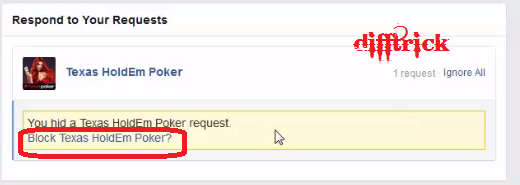
STEP 3:- Now see app you want to block Facebook game requests for and click the “X.” See below image I am block Texas HoldEm Poker game request.


STEP 4:- Then click on the Block Texas HoldEm Poker game. 


Now click on the Confirm Button.

Another Option for Block games notification Requests:-
STEP 1:- Login your Facebook account and click on the Setting option.
 STEP 2:- Then Click on Apps from left sidebar.


STEP 3:- Now find apps and click on the Edit option.
  
STEP 4:- Then click on the Never option. (See images for more details)

For Mobile Users follow these simple steps:-
STEP 1:- Open your Facebook apps on your mobile.
STEP 2:- Click on the more option are show in bottom. And click on the Setting option.
STEP 3:- Now UN Check the Application Request.
Wow you done it@

@@Thanks###. Enjoy the facebook trick in difftrick.

How to Remove My Pictures from Fake Facebook Profile, Some One misuse My Picture?


HI…Friend’s Today I am discuss about, Someone Using My Pictures in Fake Profile , How to Remove Them? I think every person is using facebook social media. And he/she are post his personal picture are info to his friend’s. But some person are miss used facebook, he Collecting your private information’s and picture are miss used and make fake profile, for harassment purpose. I think you have listened this type of question every day.This type of problem solution solved by Facebook help center.

 
Do You Know How to Report inappropriate or abusive things on facebook.

Send a Message to Person and tell about that Remove this post or contain. Which you don’t like.
You use the report with spam link post or photo to submit a report. (Spam, harassment or others issue).
Unfriendor block the person.
Read the Facebook Community Standard for information about what is and not allowed on facebook.

Some one used My Picture How to remove it:-

If you want remove own picture from some one used for harassment purpose, Visit Image Privacy Rights Section of Facebook Help Center to learn about unauthorized photos and videos and report them.

Help Center provide information about how to repost photos and videos of their privacy rights. When you follow that rule and instruction, that will remove photos and videos that you report as unauthorized.

I think this is help for you. If any type Query or Problem Comment on below.

Like to visit Latest Facebook Tricks:-


How to Create Your Own Smiley/Emoticon for What’s up, WeChat and Others?

In this time so many types of messaging apps are available in Android. Every apps are use common emoticons but we want to create a own emoticons and smiley. Let’s see how to create own smiley or emoticon for what’s app, WeChat and Viber and others messenger.

Smiley DIY

Smiley DIY is a most famous apps for android, help of this apps you create your own smiley or Emoticon for messaging apps. This app is developed by SMeiTi. And it is available for free in Google Play Store.

Let’s See How work this apps?

It is very simple and easy to handle by user, it is integrates in almost all messaging android’s apps.
Lest simple explanation, if are you using Whats up App you are created own smiley or Emoticon to Friend’s whats up app.

How to use these apps?
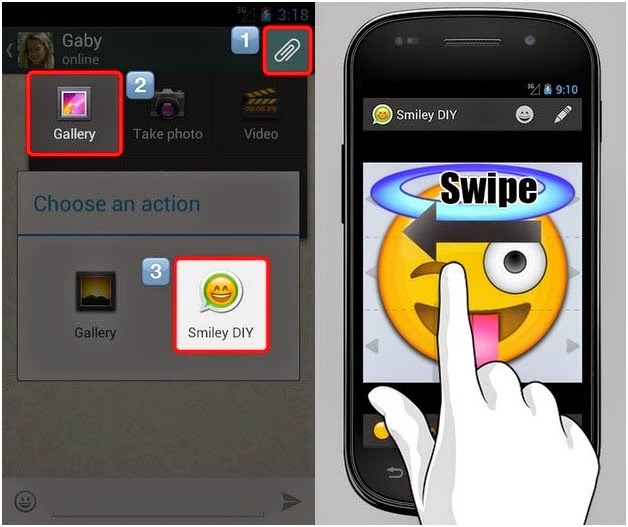
You have click on the clip icon at top right corner. Then you select or click on the gallery.
After selecting gallery then last open are come to choice DIY icon and click or select it.
See below images for more details.
Now create own emotion and Smiley and share to your friend’s.

It is very simple to use. You can choice your nice faces, mouth are others images. And make any emoticon, and easy to edit text and swipe to figure for swiping.
So many types of effects are available in DIY apps. Change background color, font color, size of pan, shade and more effect’s are available in this apps. It provides so many type of customization option also. You can rotate degree of smiley by rotating your phone.
DIY is interesting fun for user. You can enjoy these apps making your own smiley emoticon.
If you want to download this apps for free Available in Google Play Store.


@@Thanks!! For visit Difftrick. Keep watching android Tips and tricks on Difftricks.

Like to visit Latest Android Tricks:-

Best 22 Amazing Facebook Tricks and Tips 2014

Hi. Everyone i am come withe 22 latest Facebook trick and Tips 2014. Facebook is a social networking site that I spend lots of time on. It serves both as a networking and entertainment platform for me. The tricks you shared will sure spice up the time I spend on Facebook.

Hello Friend’s, today I will be sharing some cool Facebook tricks 2014 , tips and tutorials under a single post. I sure you like this post. Diff trick is already posted many Facebook Tricks. And i am put all Facebook posts and trick in one page.


1. Make 5000 Friends in Just One Day:-

How to use the email invitation system on Facebook to get lots of Face book friends. Most people want to get lots of Facebook friends and/or page likes for many reasons. One of these reasons is to get many likes and comments whenever we update our status on Face book.


Get Click on this link and Send Request or make 5000 Friend in one Day.


2. Download Facebook Videos:-

We are see many videos on facebook daily and some of them are really worth downloading, but wait! How to download ? 
You have any facebook video from Go to Downvids and paste the video link. And also select the video format in which you want. 
Another link to download facebook Videos. Click Here


3. Accept All Friend Requests by a Single Click:-

Suppose you get lots or more of requests daily and you tired to accept each and every request? And you don't have to worry. Difftrick are share small script you can easily accept the entire request at once.


Click here to get script for accept all Friends Requests in a Single Click


4. Add All Friends to any Group by a single Click:-

If you try to invite your friends without this method, than you are time wasting, because one by one its take so longer time. But using this trick you can easily invite your all friends by one click with so fast. Click here Add Friend in Group by a One Click.

5. Invite all Friends to a Facebook Event or Page by a Single Click:-

Everyone know that fan page is very important for your business sites, Brand community or many more, Using this you can promote your product via this, Means If you had a product and you wanna promote this via social site than you must create a Facebook fan page.
If you try to invite your friends without this method, Than you are time wasting, because one by one its take so longer time. But using this trick you can get fast Facebook like or easily invite your all friends by one click with so fast. Click here


6. View Private Facebook Profile Picture in Full size:-

Facebook did was to protect the profile pictures with privacy Settings. Well, it’s actually a good thing. Because you’ll be safer from people with bad intentions. But, what if someone, with his entire body as a private profile picture, sent you a friend-request and at the same time, you can’t recognize his name.
Read more to View Full Size Profile Picture.


7. Remove Facebook Advertisements:-

You know the any ads are requiring high bandwidth and more data uses and it is more problem for 2G internet service provider. You have to remove facebook ads from your facebook home using this script Facebook:Cleaner you can easily remove Facebook Ads from your home pages.


8. Post Status in Multiple or All facebook Groups in a Single Click:-

Some person is share new and ides want to post your status or write message in all groups. If you do one by one it’s a time consuming. But we have solve this problem is easily. Click here to post Status in Multiple Group in One Click.


9. How to Know Who Visits Your Facebook Profile:-

How to trace facebook profile visitors. We have to know there is no any limitation of the face book. Read more


10. Block Facebook App Requests & Notifications:-

It’s not the friends fault as most of the games on Facebook require send requests to friends in order to level up or progress further in the game. Eventually these game and app requests will keep piling up and a better option would be to disable these notifications. Click Here


11. Auto Post Birthday Wishes on Facebook Friend's Wall:- 

One may miss wishing your friend on Facebook by being away from it or not logging in to Facebook. So use the application to wish your friend even though if you don't open Facebook..! Read more


12. Convert Your Personal Facebook Account Profile into Business/Fan Page:-

I am discussing still using a personal Facebook profile to promote your business?
Absolutely yes, Facebook introduce migration feature because Facebook account have limitation of 5000 friends. So is you are using Facebook for business purpose or if you are big star or famous personality. Read more


13. Send Message on Facebook Even if You Are Blocked:- 

Hey, someone blocked you on Facebook. Don't worry you can send him message even if you are blocked. Click here@


14. Send Friend Request Even If you are Blocked:-

Friend request is blocked, if your pending request is reached to a limit. And you are blocked for sending requests for 3, 5 days or even for a month. Never mind, I am gonna tell you a working trick for sending request even when you are blocked. Read More@


15. How Much Time You Have Wasted on Facebook:-

TIME has created a calculator that determines how much of your precious life you've lost to Facebook. The app uses time stamps from every post in your feed including your first one, where it will then estimate the date you created the profile. Check It@


16. Backup you’re All Facebook Data easily:-

Backup all your face book data. Image, videos, link, chat info and comment any things you have posted in your facebook account, it process is start from your beginning from your facebook and at that time. Follow this link.


17. Post an Empty Status or Comment:-

First Login to your facebook account. And click on status and enter the Put below following code and press enter. Now See the post.

@[2:2: ] 


18. See who is online when you are offline:-

Sometimes it becomes necessary to check who is online which offline is. Use the below application to know who are online while you are offline. Check It@


19. See Online Friends in Facebook Chat being Offline:-

You see the person is online are not in offline mode. I think you must have failed. Do you want to know how can it be done? Click Here a way to know who’s online when you are in offline mode.


20. Make Funny Facebook Walls:-

Make amazing kind of facebook funny walls posts. Add your own images, friends etc. You can post it on your own wall after making them.
Make your own funny walls from HERE.


21. Download Photo Albums of any PAGE, GROUP or FRIEND:-

Well this trick is really helpful. By this you can easily download any facebook album or photo of anyone in your list. 
The best thing is you can even download page albums and groups album/photos as well. Start downloading.


22. Facebook Chat on Firefox Sidebar:-

If you are using Firefox, you can place the Facebook Chat at the sidebar. Click Here@


@@Thanks##I hope you liked them all. I try to my best, If you wanna like us on facebook then click here. Any kind of query or question for this tutorial comment below. And if you like this post share it to your friends. I am come with new facebook trick for you in future... #Thanks.

Code To Accept All Friend Requests by a Single Click 2014

Hello Friends, Today I give you latest trick for How to accept all Facebook friends Requests by a Single Click 2014. If you try to accept your friends without this method, Than you are time wasting, because one by one its take so longer time. 
Are you getting a lot of requests daily and you feel lazy to accept each and every request? Well you don't have to worry again, with this small script you can easily accept all the request at once.


STEP 1: First open up your request page and scroll it up to the last request so that all the requests gets loaded. 


STEP 2: Now press "Ctrl+ Shift+ J" to open up console window. Paste the code there and hit the enter button.

Now Copy the code given below:

javascript:for( i = 1;i<document.getElementsByName("actions[accept]").length;i++){document.getElementsByName("actions[accept]")[i].click();}void(0);

It can take up to 2 minutes depending upon the number of requests pending  

NOTE: When you paste the code make sure you remove our link that gets copied automatically 

Thank You !!! For More Facebook Tricks. Keep Visiting Difftrick.