About All Tech Buzz

Showing posts with label Android. Show all posts

Top 10 Android Tools for Hacking

Android has a got very important place in our Tech World Now in market you can get many devices running on Android like Smartphone to Tablets, Tablets to Camera and I can simply say that the major Portable device in the market are running on Android. 


The Google is providing more and more hacking tools and tester application for Android user and Developers. The use of these tools is security purpose and stop the cyber crime are targeting Android users.

Let’s see 10 Android tools that are meant for hacking and hackers.
 1. Hack code : - The hack mode is most famous, and every Ethical and tester or IT expert is using this tools. Hack code is use for perform different tasks or scanning exploits and reconnaissance method.

2. Androrat: - Androrat is Remote administration tool for Android hacking. It is developed in java Android for client side and in java swing to server.

3. APKInspector: - This tool is use for GUI analysts to analyze the Android application and it operation research. Other features of these tools are to aide analysts and reverse engineers to view complied package and DEX code are embedded.

4. DroidBox: - This Android hacking tools is used for dynamic analysis of Android apps.

5. Burp Suite : - The best tools for security testing of web apps are Burp Suite. It works all testing process, from mapping and analysis of any application to attack on surface. Any vulnerability are execute in any programs and apps that find it and solved that problem.

6. zANTI: -  It is used for network diagnostics toolkit and provide cloud reporting network safety.

7. Droid Sheep: - Droid Sheep can be easily used by anybody who has an Android device and only the provider of the web service can protect the users. So anybody can test the security of his account by himself and can decide whether to keep on using the web service.

8. DSploit: - dSploit is an Android network analysis and penetration suite which aims to offer to IT security experts/geeks the most complete and advanced professional toolkit to perform network security assessments on a mobile device.

9.AppUse – Android Pentest Platform Unified Standalone Environment:-  This Apps is basically use for mobile application testing, it is add unique concept for made a tools for testing criteria and other apps are testing and check the apps working condition are not. It is developed by App use Virtual Machine.

10. Shark for Root: - 
The Shark Reader is basically based on TCPDUMP. It is use to dump wire Shark network (Work on 3 G and WiFi) for Traffic sniffer. It is nice tool for sniffing traffic network.


@@Thanks!! For visit Difftrick. Keep watching android Tips and tricks on Difftricks.

Like to visit Latest Android Tricks:-

Top 5 Android Games: August 2014

The end of August as return, therefore it’s time to seem at the simplest golem games that crossed our desks. This month, we tend to saw the discharge of a number of nice Indie games, which means that the titles didn’t have major backers funding their development. in a very few cases, these games find yourself being a number of the simplest, however after all, there's little question that success publishers will obtrude nice work too, as we tend to saw with Game loft within the unleash of contemporary Combat 5.

A couple of the games we tend to list this month feature addictive characteristics, which means it's straightforward to die within the game, however even easier to press “replay.” In addictive games, you wish to undertake once more, hoping to try and do higher than you probably did the last spherical. different games for this month embody a puzzle, platformed, and a Federal Protective Service title.

1. Thomas Was Alone 

Thomas Was Alone is a remarkable game, with all of the characteristics of a basic platformer. However, TWA is most quite a generic platform game, as there's narration throughout the title by Danny Wallace.
You play as a acutely aware parallelogram, attentive to his own existence in an exceedingly mysterious world. Your goal is beat levels, whereas conjointly befriending alternative shapes within the game. It’s a rather cute game, however that small parallelogram may tug at your compassionateness.
For the worth of $5.39, skip that morning low from Starbucks and check it out.

2. Modern Combat 5: Blackout 

The next installment within the fashionable Combat series, Blackout is presumably the primary FPS from Gameloft that options zero IAPs. Once you get the sport, you get the complete title with no hidden gimmicks.
The game itself kicks major butt, filled with sweet 3D graphics, action-packed gameplay, and a lot of weapons in your armory to require down cyber terrorists round the world.
 If you're a lover of taking part in FPS titles on your mobile device, check this one out.


3. Blek 

At first, Blek is Associate in Nursing surprisingly developed puzzle, however once you reach the upper levels during this game, you may feel your fingers running up your head, able to rip your hair out. It will be quite frustrating.
Using your finger to creature gestures, the gestures then move a couple of level, bouncing around attempting to gather dots. however if your gesture hits a wall or object, it vanishes and you need to begin everywhere with a replacement gesture. It’s terribly difficult to master, however the gameplay is contemporary and also the music is amazing.
For only $2.99, it’s a requirement obtain.

4. Timberman 

Timberman isn’t specifically a replacement game on Google Play, however it appears to possess been “discovered” this month, because of it creating the rounds across the online. within the game, you play as a lumberjack UN agency is {attempting|trying|making Associate in Nursing attempt} to chop down an impossibly tall tree, whereas avoiding branches.
While chopping, you need to dodge branches by standing on the correct or left aspect of tree, with the most goal being to visualize however so much you'll be able to get. I need to regarding sixty cuts, that was spectacular on behalf of me, however there ar others UN agency rise to 200+.
It’s a awfully addictive , however fun game. And for the worth of free, it’s a no brainer.

5. Don’t Touch The Spikes 

Being somewhat paying homage to Flappy Bird, Don’t bit The Spikes could be a terribly fun, {yet Associate in Nursingother|yet one more|one more} addicting game that includes an loveable very little bird. Moving from left to right, your goal is to not hit spikes (obviously), whereas conjointly aggregation apples to upgrade your bird’s look.
The feel of the sport is extremely responsive, that is useful, considering that one wrong faucet may send your bird into deadly spikes. It’s cute, easy, and straightforward to choose up and drop at a moment’s notice.
The game is completely free, however will feature some annoying ads. If you'll be able to handle some ads, check it out. 

How To Use Your Phone as A Wireless CCTV Camera??

Have an old android mobile (or even a tablet) and you want to use that as CCTV camera at home? It is possible with only 2 apps or software. I think everybody it loved it. It is also required Android mobile. Because this trick is based on android apps via Bluetooth and Wi-Fi connection. And you need PC or laptop for needed. You have also record the Video from Webcam on your receiver. It is worked on every android mobile phone.


There are many software available in market in android, iOS and Nokia market but it required more and more apps for configuration with PC and Mobile phone.

In many so many apps available for this trick but I found free apps for it, easy to handle it.


Download Important Software:
First you have download and install Smart Cam on your PC or Computer. Download Link.
Now, you install Smart cam in your phone. Download Link.

Connect Mobile Cam via Bluetooth:
STEP 1: Open Smart cam in your Computer. On PC set Bluetooth on setting menu in smart cam.


STEP 2: Now Start Smart Cam in your mobile. Set Bluetooth in setting on app and select your PC as a receiver.


STEP 3: Wow, After Completed Above Steps, then See Videos on Receiver. Click on the Start Recording for Record the Video.


Connect Mobile Cam via Wifi:-

STEP 1: Open Smart cam in your Computer. On PC set Bluetooth on setting menu in smart cam.

STEP 2: Now Start Smart Cam in your mobile. Set Bluetooth in setting on app and select your PC as a receiver.

STEP 3: Connect your PC with WiFi.

STEP 4: Set same port on PC app as you set on mobile.

STEP 5: After Completed Above Steps, then See Videos on Receiver. Click on the Start Recording for Record the Video.
You done it...@@

How to Create Your Own Smiley/Emoticon for What’s up, WeChat and Others?

In this time so many types of messaging apps are available in Android. Every apps are use common emoticons but we want to create a own emoticons and smiley. Let’s see how to create own smiley or emoticon for what’s app, WeChat and Viber and others messenger.

Smiley DIY

Smiley DIY is a most famous apps for android, help of this apps you create your own smiley or Emoticon for messaging apps. This app is developed by SMeiTi. And it is available for free in Google Play Store.

Let’s See How work this apps?

It is very simple and easy to handle by user, it is integrates in almost all messaging android’s apps.
Lest simple explanation, if are you using Whats up App you are created own smiley or Emoticon to Friend’s whats up app.

How to use these apps?
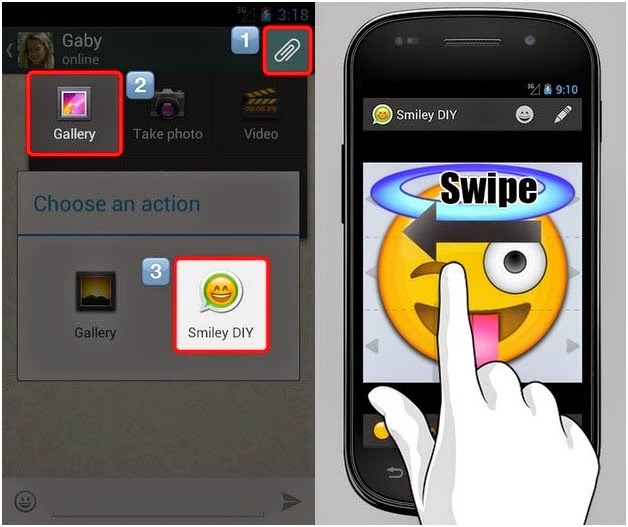
You have click on the clip icon at top right corner. Then you select or click on the gallery.
After selecting gallery then last open are come to choice DIY icon and click or select it.
See below images for more details.
Now create own emotion and Smiley and share to your friend’s.

It is very simple to use. You can choice your nice faces, mouth are others images. And make any emoticon, and easy to edit text and swipe to figure for swiping.
So many types of effects are available in DIY apps. Change background color, font color, size of pan, shade and more effect’s are available in this apps. It provides so many type of customization option also. You can rotate degree of smiley by rotating your phone.
DIY is interesting fun for user. You can enjoy these apps making your own smiley emoticon.
If you want to download this apps for free Available in Google Play Store.


@@Thanks!! For visit Difftrick. Keep watching android Tips and tricks on Difftricks.

Like to visit Latest Android Tricks:-

5 Most Famous Apps for Downloading Music on Android or Smartphone

There are so many mobile apps out there. And so many apps for Music’s downloader. And 5 Most famous and great apps for downloading music on android or Smartphone easy and use most amazing feature to editing the song and make a ringtone. We are love listening music on our free time.
Friend you can easily download your favorite music’s for offline playback. These apps available on the Google Play Store that lets you download mp3 songs for free on your Android device.


The Great and most famous Music Download apps Paradise Mp3. This app lets you search and listen to copy left mp3 songs/ music files. You can also search music by Artist and title or composer.


Gtunes Music Download is a simple app for download songs for free.
You easy to save download link and share the friend’s.
Click on the Link and download this best music app from play store.


Tunee music is the best free music app that you can use to download free music. You can search song by title, artist.

Type the song or what you’re looking in Search box.
Click on the Link and download this best music app from play store.
The downloaded music files will be automatically stored on Music folder in your phone’s internal storage.


Another free Mp3 Music Download Pro is Android app for downloading free music from online.
Help of this app you easy to edit any songs and make ringtone. You easy to save download link and share the your friend’s.


5. Download free music application

Download free music app is a very simple music android app extremely easy to use the download free music’s online. Simply typing what you’re looking for in the Search box and you’ll get a list of results.
Type the song or what you’re looking in Search box.
Click on the Like and download this best music app from play store.


@@Thanks, Keep watching Android posts in Difftrick.!!

How To Make Cartoon Camera for Android ??

I have recently started to look at various camera apps for Android, from the popular Instagram to solutions that are less popular but still pretty good in terms of functionality. Cartoon Camera is an app for Android 2.2 and up that is adding various real time filters to the camera while you are using it. This is different from Instagram which applies the filters after a picture has been taken.
  
Download Cartoon Camera from Here.

The free version of the app ships with a limited number of filters and advertisement, the paid version, currently on sale for less than 1 Euro does not come with those restrictions. Once you have installed the app on your phone you can open it the usual way from the list of installed apps. When you start the Cartoon Camera app, you are directly taken to the "take photo" part of the app. The app adds a filter to the camera automatically and in real time, making it an interesting experience just to move the camera of the phone around a bit to check out how various items or locations in your surroundings look like.


The following options are provided by the app when you use it:

  • Switch from the main camera to the front facing camera to take profile shots or use that camera to take a photo
  • Take a photo
  • Use the edge slider on the left or the color sensitivity slider on the right to modify the camera picture
  • Use auto focus by tapping anywhere on the screen
  • Select a different filter. A few, like Sepia, Color Drawing or White Strokes are available for free, while others are only available in the Pro version.


The app had a few issues when I used it. First, you see on screen apps sometimes when you open it. This can be an offer to upgrade to the pro version or to rate the app on Google Play. This is in addition to the ads that you see at the bottom of the camera screen when you use it.

Sometimes, an image gets stuck on the screen, and the only option then was to exit and reopen the application to resolve the issue. At other times, it took a couple of seconds for the app to start up and it looked like it froze at that time.

Cartoon Camera is regardless of that a fun app to take photos with your Android phone. If you ever wanted to create a comic but lack the drawing talent, you might find it suitable to create that comic for you.


Download Cartoon Camera from Here.


Thank You !!!!!For More Android Tricks...Keep on Visiting Difftrick.


How To Download Android Apps from Google Play without Google Account ??

Google Play is the official Android app store. It offers application and game downloads, movies, music and books among other things and depending on the country you are accessing the store from.
If you are using an Android device, chance is that you can access the Play store either directly on your device using the Play store app, or on the web to download, rate or review apps.

There are two situations where you may not be able to download apps from the store.

The first is if the device manufacturer has not obtained a license from Google to add the Play Store application to the device.

If the Play Store app is not listed on the phone and if you cannot install it either, then it is likely that your device is not supported at the time.

The second is if you receive error messages when you try to download apps from Google Play. For some reason or the other, you may not be able to download apps this way even if your phone is supported.

To Download Apps Directly Follow these Simple Steps:

Step 1: Open APK Downloader.

Step 2: Now Open App from Google Play which you want to Download and Copy Address or Link of that App.


Step 3: Now Paste this Link into APK Downloader.

Step 4: Click on Generate Download Link.


Step 5: The APK Downloader generates a download link for you that you can click on to download the apk file to your local system.


Thank You !!!!!For More Android Tricks...Keep on Visiting Difftrick.

How To Measure your Heart Rate with Android Camera ??

You have lots of options to measure your heart rate. One of the easiest options is to measure your pulse by placing two fingers on the thumb side of the wrist until you feel the pulse beating there.

To get an accurate reading, count the pulse for one minute but at the very least for 30 seconds. If you count it by 30 seconds, multiple it by two to get your heart rate.

There are other locations on your body where you can measure your heart rate: the neck, under the biceps or over the abdomen are just some locations where this is possible.

While easy to do, since you do not need any special tools to measure your heart rate besides a clock, it is not the most comfortable option, especially when you are in a noisy environment or one where it is difficult to concentrate.

To Measure your heart rate with an app Follow these Simple Steps:

Step 1: Download the Instant Heart Rate. 

Instant Heart Rate is a free application for Android that measures your heart rate in a matter of seconds. It uses the camera of the device to do so.

Step 2: Install the application and run it.


Step 3: Click on Measure to start measuring. All you have to do is hold your finger against the camera lens for the measuring to start.


Step 4: It usually takes about fifteen seconds before the heart rate is displayed on the screen.


Step 5: The heart rate is shown on a graph that is divided into green, yellow and red parts, indicating good, average and problematic heart rates.

So How is this done and How accurate is the measuring?

According to the developers, it is tracking color changes on the fingertip. These color changes are directly linked to the pulse, and it is therefore possible to measure the heart rate using the camera.

Medical Pulse Oximeters, those little devices that you put your finger into to measure your heart rate use the very same technology to do so.


Step 6: You can also share it on social networking.


Thank You, And Keep Visiting Difftrick.